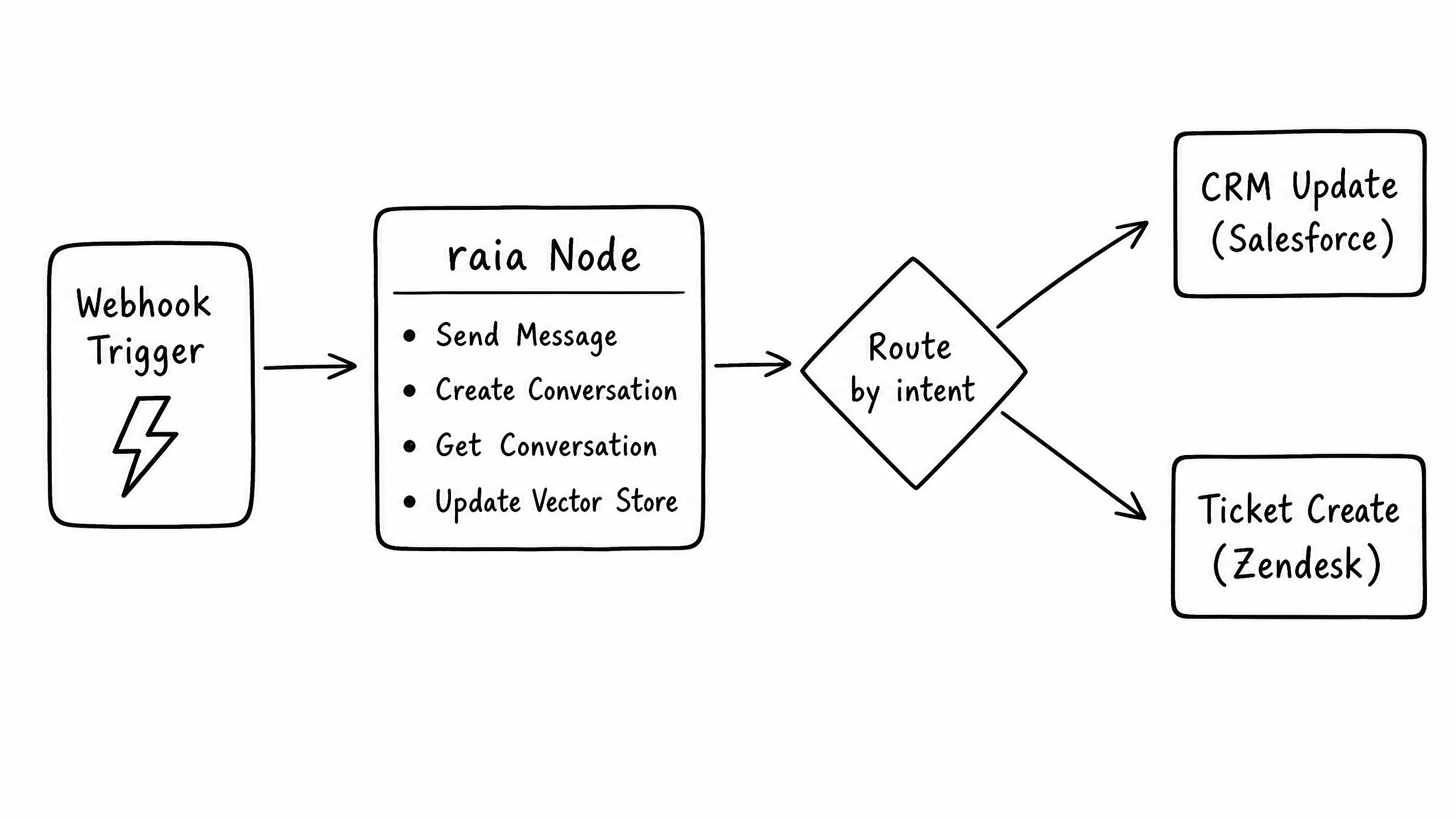
Overview
The raia n8n node lets you integrate agents into multi-step automated workflows. Use n8n to trigger agents from external events, or use agents to trigger n8n workflows mid-conversation.
Installation
- 01
Open your n8n instance.
- 02
Go to Settings → Community Nodes.
- 03
Click Install and enter n8n-nodes-raia.
- 04
Restart your n8n instance.
Authentication
Authenticate the node with your Agent Secret Key from raia Command. Add a raia node to your canvas, click Create New Credential, paste your Agent Secret Key, and save.
Available actions
The node ships with four native actions covering the most common orchestration patterns.
Action 01
Send Message
Sends a message to an existing conversation and waits for the agent's response.
- Inputs
- Conversation ID, Message Text
- Output
- The agent's text response and updated conversation state.
- Use case
- Building an SMS or WhatsApp integration where n8n routes messages back and forth.
Action 02
Create Conversation
Starts a brand new conversation thread with the agent.
- Inputs
- Initial Message, User Context (optional)
- Output
- The new Conversation ID and the agent's first response.
- Use case
- Initiating an outbound outreach campaign based on a trigger in your CRM.
Action 03
Get Conversation
Retrieves the full message history and metadata for a specific conversation.
- Inputs
- Conversation ID
- Output
- Array of message objects.
- Use case
- Pulling a completed chat transcript onto a Zendesk ticket or Salesforce record.
Action 04
Update Vector Store
Programmatically uploads new text content into the agent's Knowledge Base.
- Inputs
- Content String, Metadata (optional)
- Output
- Success confirmation and document ID.
- Use case
- An ETL pipeline that syncs new Help Center articles into the agent's brain nightly.
Pattern: agent-triggered workflows
The most powerful way to use n8n with raia is to have the agent trigger the workflow mid-conversation.
- 01
In n8n, start your workflow with a Webhook Trigger node.
- 02
Copy the Webhook URL provided by n8n.
- 03
In raia Command, open the Functions Skill.
- 04
Create a new Function (e.g., create_support_ticket).
- 05
Paste the n8n Webhook URL into the Function's Endpoint field.
- 06
Define the JSON payload structure.
When the agent decides it needs to create a ticket, it calls the Function, which fires the Webhook, which kicks off your n8n workflow to do the actual ticket creation in Zendesk.
Workflow visualizer
See the live A2A orchestration canvas and explore the three core workflow patterns in action.
Open workflow visualizer →Frequently asked questions
Do I need to write custom code to use the n8n node?
Can I route a conversation from one agent to another using n8n?