What you will learn
- Explain the difference between a traditional chatbot and a raia AI agent.
- Understand the four-step lifecycle of building an agent: Define, Train, Test, and Deploy.
- Identify the five core applications in the raia ecosystem and know when to use each one.
- Understand your specific role and responsibilities as a Functional Expert in the agent-building process.
The Big Idea: Agent vs. Chatbot
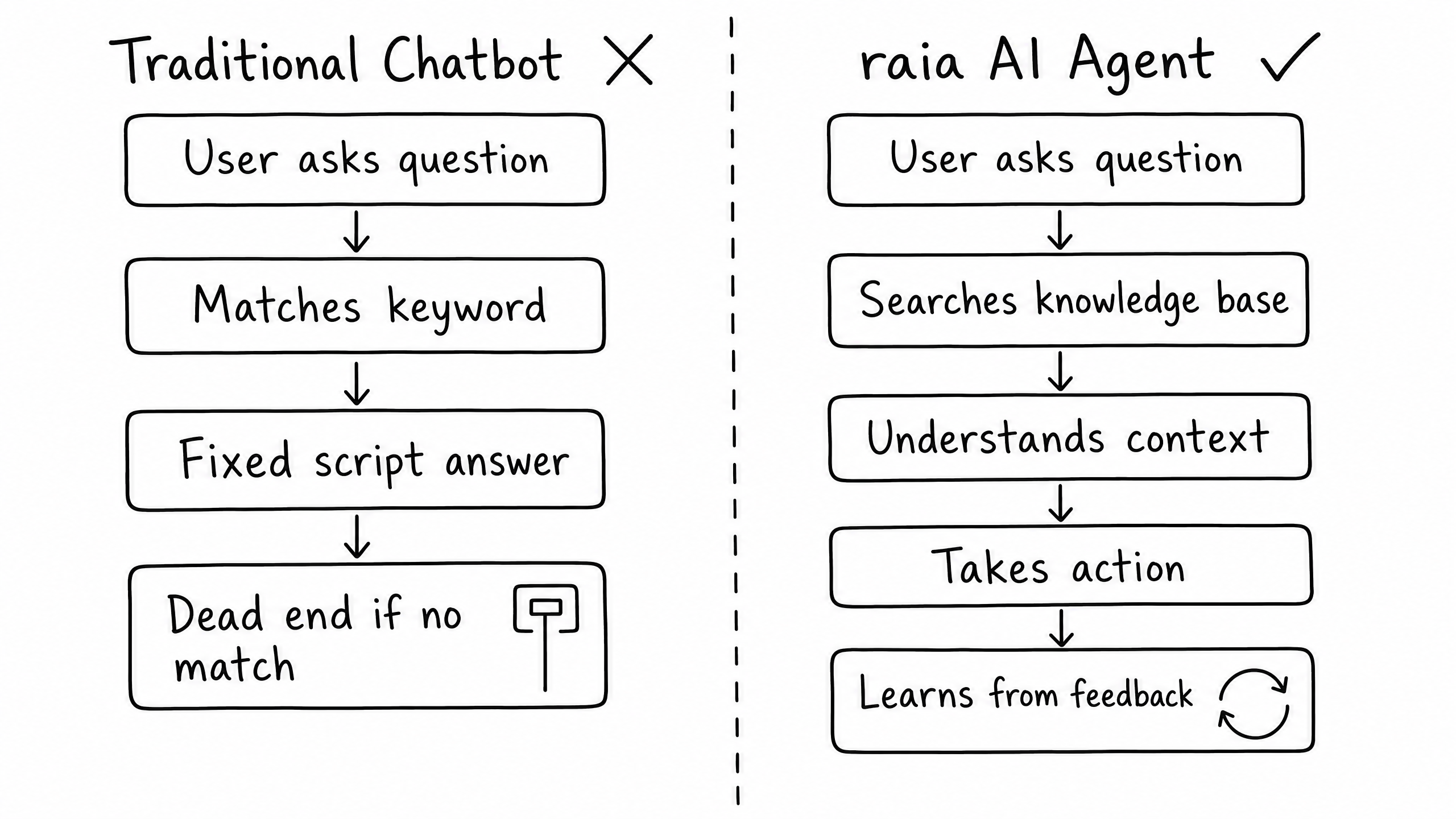
An AI agent is not a chatbot. A traditional chatbot follows a fixed script — it can only do what it was explicitly programmed to say. When a user asks a question outside the predefined keyword rules, the chatbot hits a dead end.
An AI agent acts as a digital team member that works for you 24/7. It understands context, draws on a dynamic knowledge base, makes decisions, and takes action — answering a complex question, escalating a sensitive issue to a human, sending a follow-up email, or logging a support ticket, all in a single natural conversation.
In the raia platform, an AI agent is built once, trained on your specific business knowledge, and deployed across every channel your customers or team use: website chat, SMS, email, and voice. It provides a consistent, intelligent presence everywhere.
The Four-Step Lifecycle
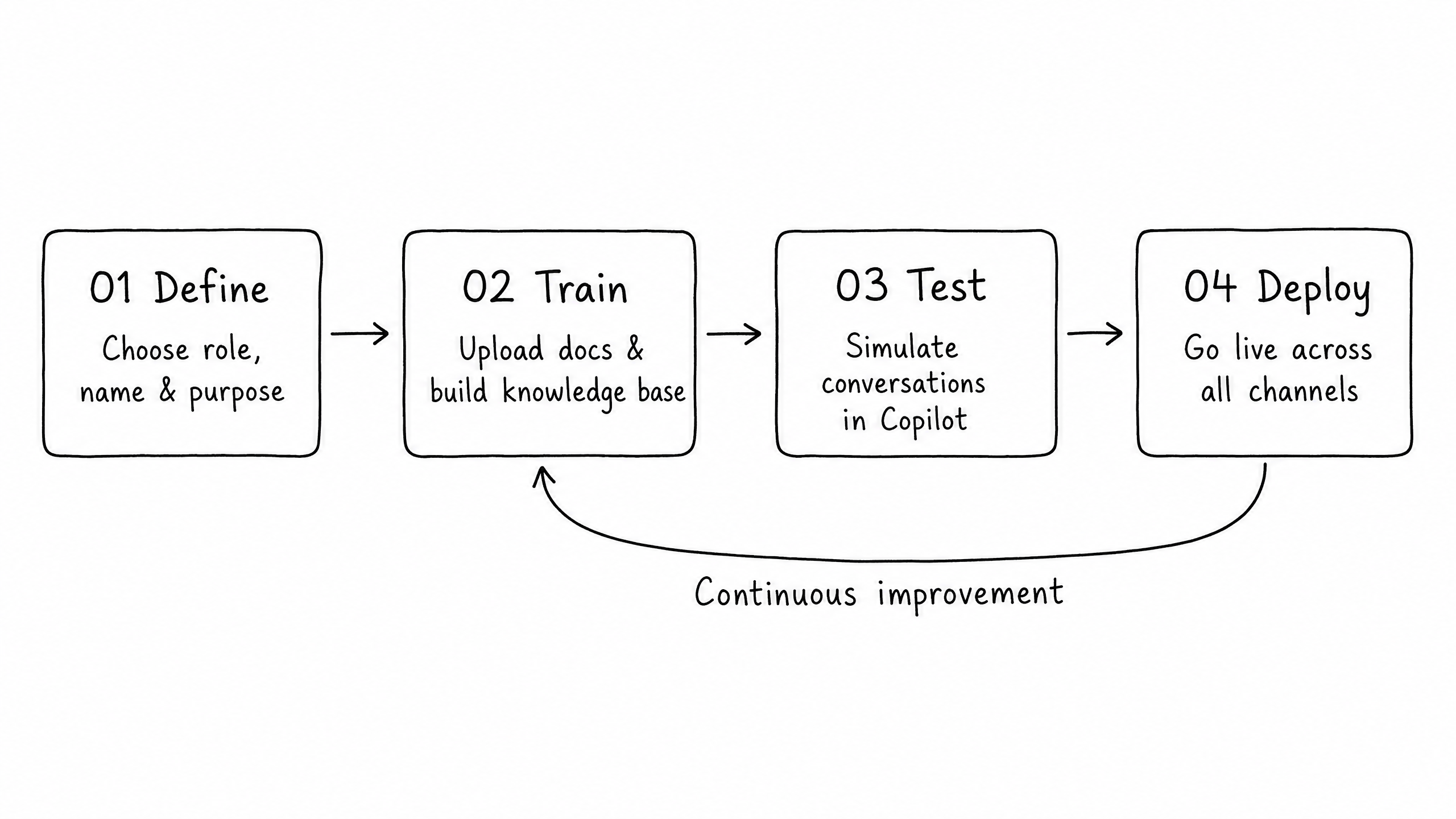
Building an AI agent with raia does not require months of development. The typical agent deployment takes one to two weeks and follows a straightforward, four-step lifecycle.
Step 01
Define
Choose a role for your agent (support, sales, HR, legal), give it a name, and describe its purpose. Establish personality, set boundaries, and decide what actions it is authorized to take.
Step 02
Train
Upload your business documents, policies, FAQs, and product information into raia Command. This content becomes the agent's knowledge base — the central source of truth.
Step 03
Test
Use raia Copilot to simulate conversations before the agent interacts with real customers. Catch knowledge gaps and refine behavior without writing any code.
Step 04
Deploy
Take the agent live across web chat, SMS, email, and voice. Configure once, deliver a unified experience across all channels with full visibility into every conversation.
The Five Applications Working Together
The raia platform is built around four core applications that work together as a unified system. A fifth application, raia Control, is available as an optional add-on for teams that want to run proactive outbound campaigns.
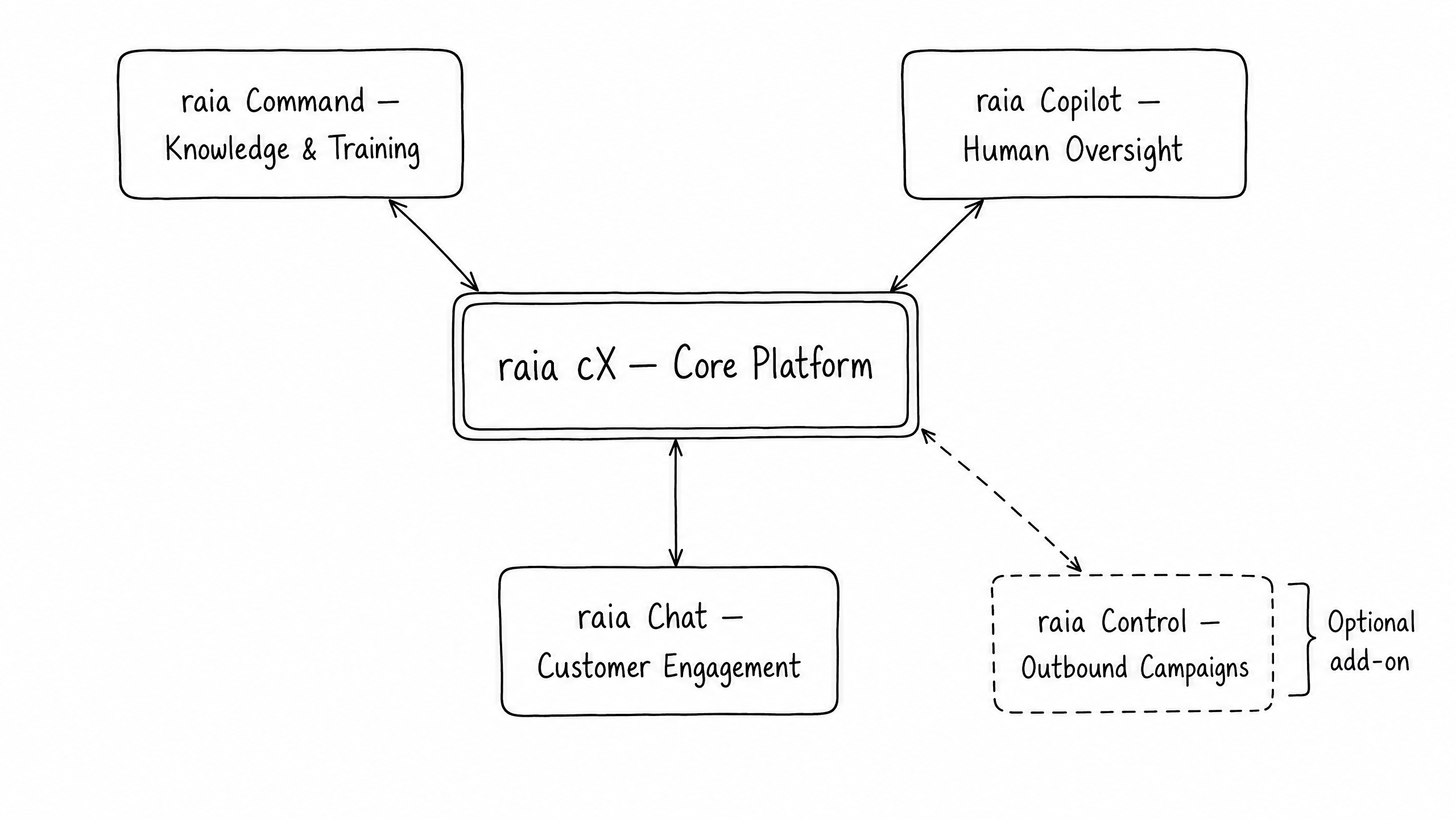
The four core applications
| Application | What it does | When you use it |
|---|---|---|
| raia cX | The core platform. Home base where your agents live, where you manage their skills, and where you control access permissions for your team. | Always. The foundation that connects everything else. |
| raia Command | Knowledge and data hub. Upload documents, train your agent's vector store, and connect external data sources like Google Drive or Zendesk. | When building or updating your agent's knowledge base. |
| raia Copilot | Human oversight tool. Monitor live conversations, test the agent, provide feedback, and take over a chat when a human is needed. | During testing, and every day once the agent is live. |
| raia Chat | Customer engagement layer. The live chat widget, SMS number, email inbox, and voice line your customers interact with. | When setting up how customers will reach the agent. |
Optional add-on
raia Control
The outbound campaign tool. Sends proactive messages — follow-ups, reminders, and outreach — at scale using contact lists and automated sequences. Use it when you're ready to move beyond reactive support into proactive customer engagement.
Your Role as a Functional Expert
As a Functional Expert, you are the most critical person in the agent-building process. Because you understand the business deeply, you know what questions customers ask, what the correct answers are, and what scenarios require human intervention.
Your job is not to write code or manage API endpoints. Your primary responsibilities are to:
- Define what the agent should do and how it should behave.
- Provide the high-quality knowledge the agent needs to answer questions accurately.
- Test the agent against real-world scenarios before it goes live.
- Review conversation logs and refine the agent's instructions over time as your business evolves.
The tools you will rely on most heavily are raia Command (for training the knowledge base) and raia Copilot (for testing and human oversight). The subsequent modules in this path will guide you through each of these steps in detail.
Frequently Asked Questions
Do I need to know how to code to build an agent?
No. The Functional Expert path is entirely no-code. You will use guided wizards to write instructions in plain English and upload standard documents (like PDFs or Markdown files) to train the agent.
What happens if the AI agent doesn't know the answer?
You can configure the agent with an Escalation skill. If the agent is unsure or the user asks to speak to a human, it seamlessly transfers the conversation to a human operator via raia Copilot.
Can one agent handle both our website chat and our customer support email?
Yes. In raia, you build the agent once and enable different Skills (such as the Live Chat Skill and the Email Skill) so the same agent operates across multiple channels simultaneously.