Security & Compliance
Auditor Skill & Human-in-the-Loop
Real-time PII, hack, and custom auditors plus the Escalation Skill and Copilot takeover workflow.
RBAC secures who can build and manage agents. The Auditor and Escalation skills help review conversations for security and policy concerns and arrange human review.
The Auditor Skill
Configure conversation review for security and policy concerns. Auditor settings do not guarantee prevention, blocking or compliance.
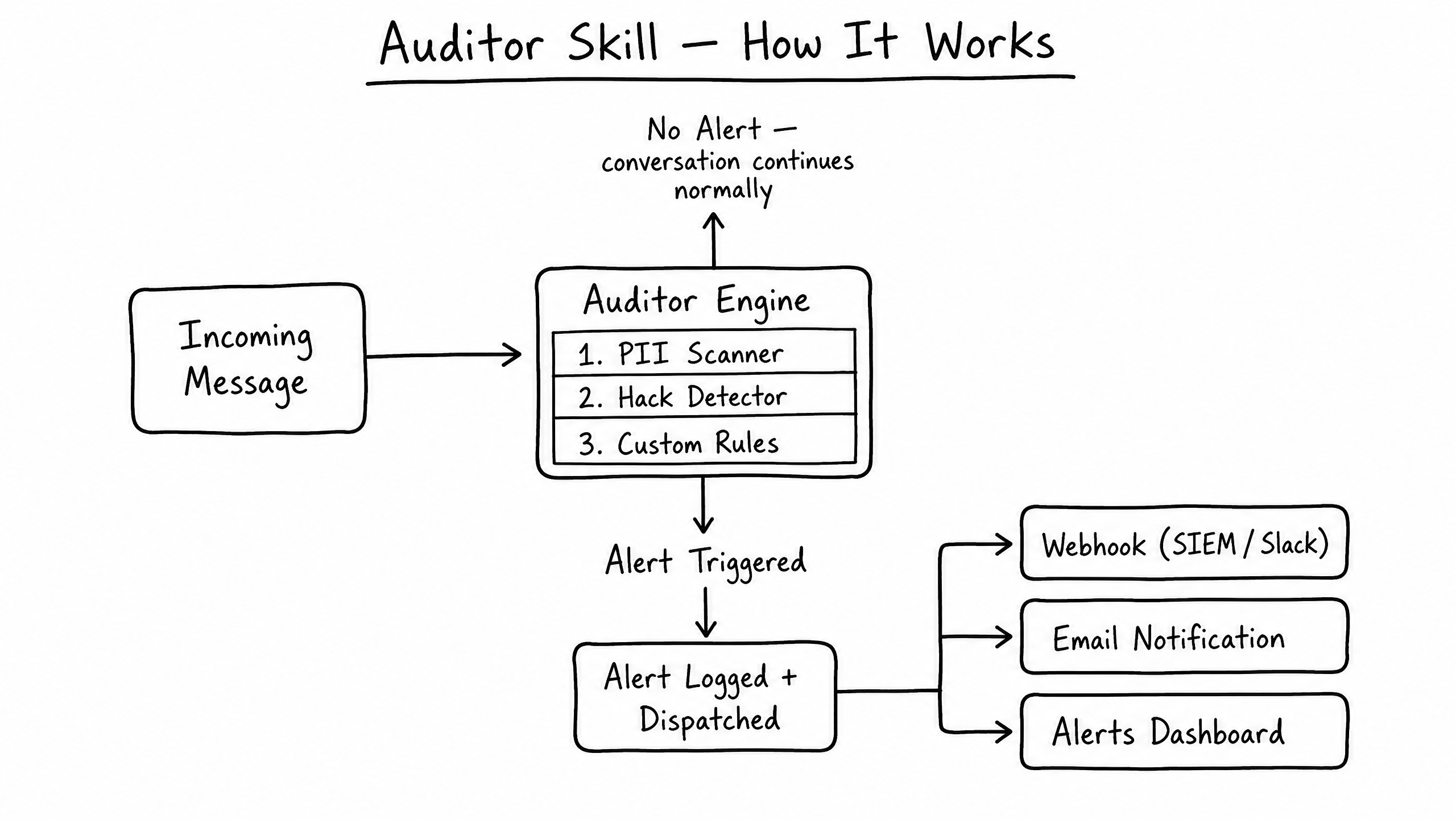
In Launch Pad → your agent → Skills → Auditor → Configuration, review Enable PII Auditor, Enable Hack Auditor and Enable Custom Auditor with your policy owner. Use fictional examples to check any alerts; these switches are review settings, not proof of blocking or compliance.
- Highlight 1: Enable PII Auditor
- Highlight 2: Enable Hack Auditor
- Highlight 3: Enable Custom Auditor
If you enable Enable Custom Auditor, enter your review instructions in Prompt. Describe the policy concern and what should be flagged for review. Save the approved configuration, then inspect alerts and the relevant conversation; an alert is not a guarantee that harmful content was blocked.
- Highlight 1: Enable Custom Auditor
- Highlight 2: Prompt
| Module | Reviews for |
|---|---|
| PII Auditor | Email, phone, SSN, financial data, and other Personally Identifiable Information. |
| Hack Auditor | Prompt-injection attempts, system abuse, and instructions designed to bypass the agent. |
| Custom Auditor | Organization-defined rules using custom prompts and keywords (e.g., flag medical-advice requests). |
Alert Dispatch & Monitoring
In Recipients, choose a Channel and enter an approved Recipient; use + Add Recipient for another recipient. Click Save when approved. Review any available alerts in the Alerts tab with View in Copilot.
- Highlight 1: Channel
- Highlight 2: Recipient
- Highlight 3: Save
Escalation Skill
Some scenarios call for human empathy and judgment. The Escalation Skill connects AI handling with human oversight.
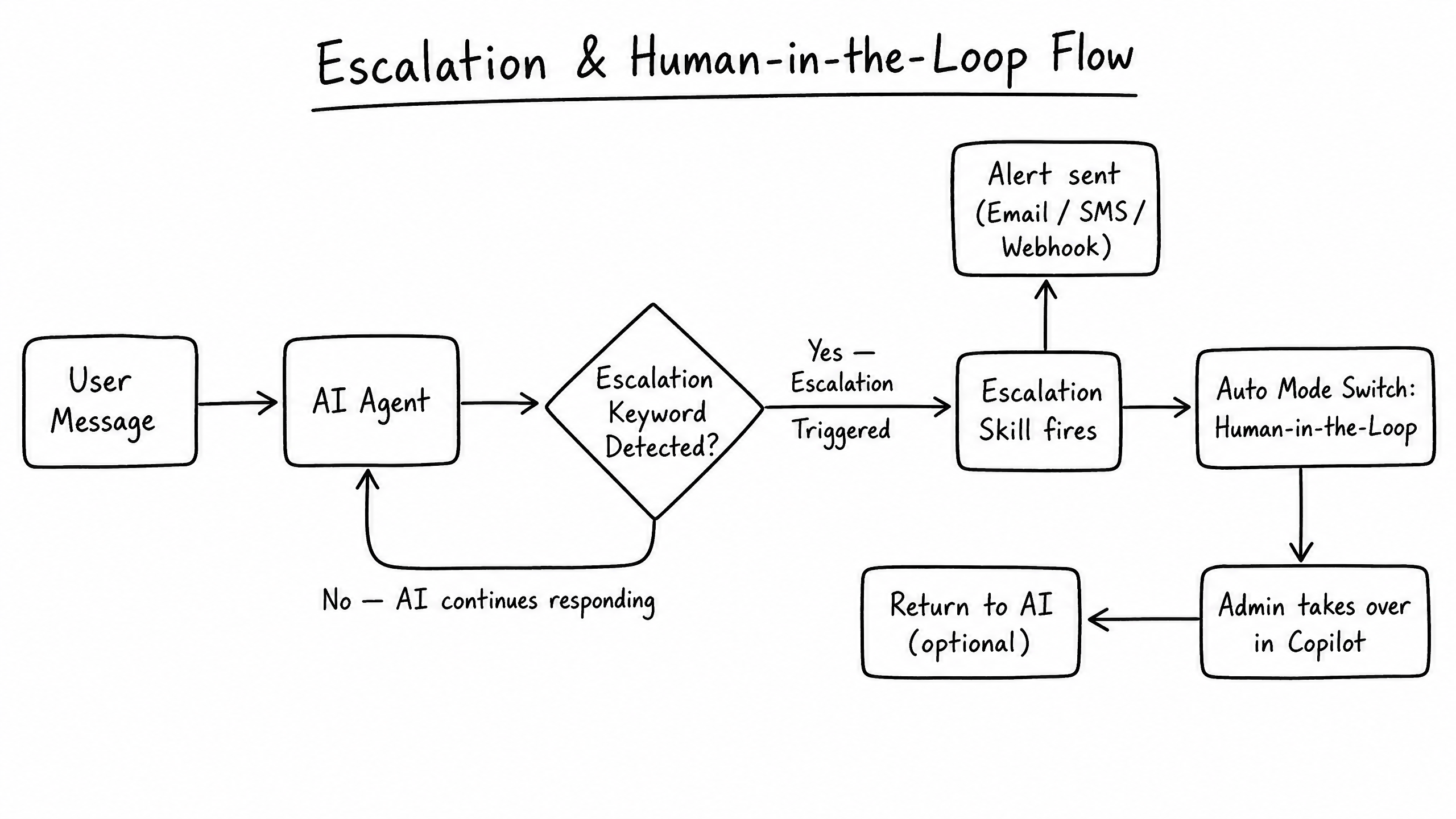
- Configure the escalation criteria for your workflow, then use a fictional conversation to check whether the intended trigger activates.
- Choose a supported channel and an approved recipient. Verify the delivered alert and its actual payload in a controlled test before relying on the handoff; configuration alone does not prove delivery.
- Write an acknowledgment that matches what the workflow has confirmed. Do not promise that a teammate was notified or will reply unless that handoff and follow-up are supported.
Human Takeover via Copilot (HITL)
Take Over Conversation
Use an authorized agent administrator to review Admin Mode in your deployment. Conversation visibility, filters and takeover depend on the role and configured channels. The owner demo screens do not establish another role’s access or takeover permissions; verify allowed and denied access with a separate fictional identity.