Security & Compliance
Role-Based Access Control & Authentication
MFA, three-tier RBAC, advanced security toggles, and Live Chat security keys with geographic restrictions.
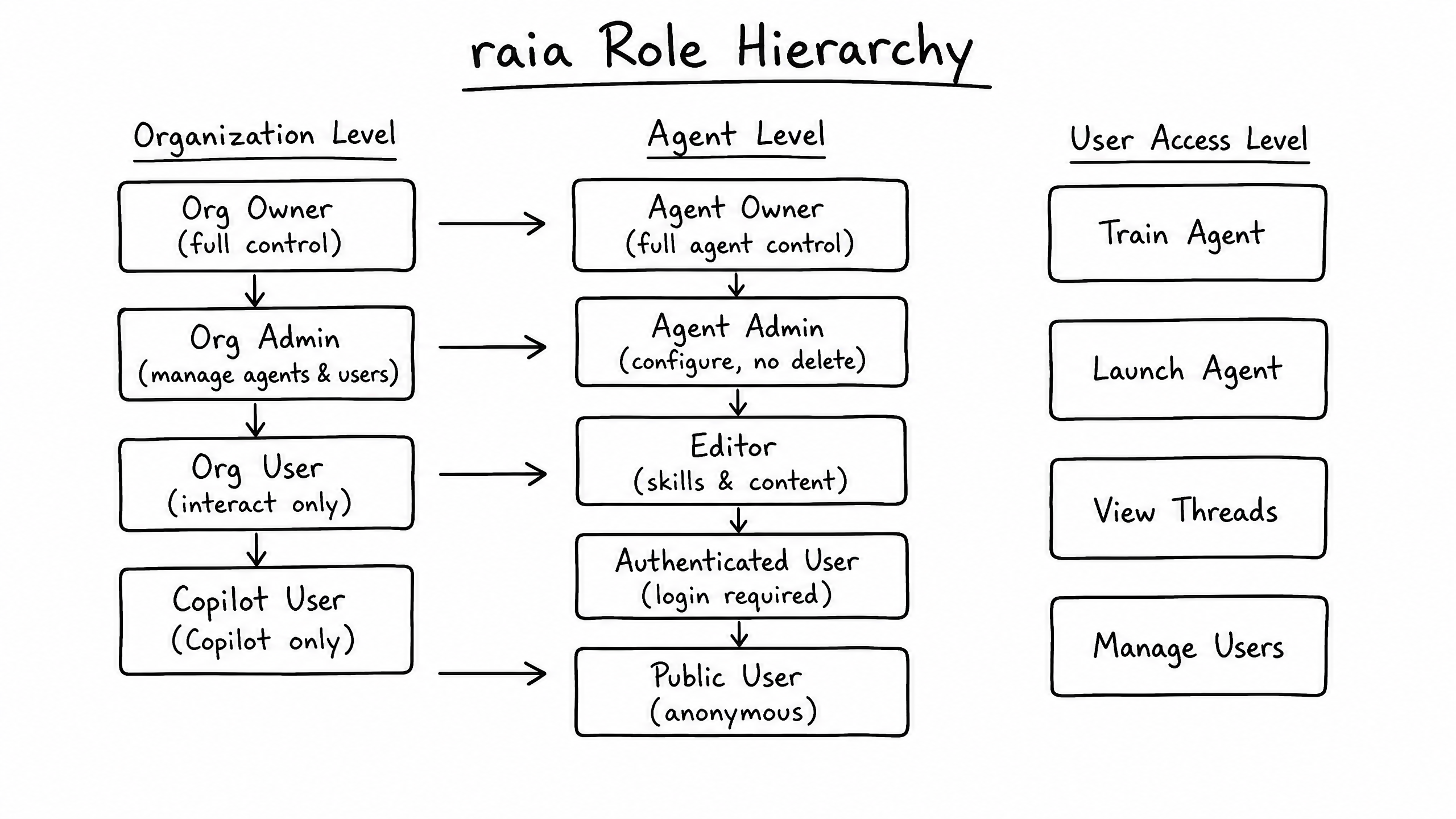
raia employs a robust, multi-tiered Role-Based Access Control (RBAC) system that operates at both the Organization level and the Agent level. This ensures users only have access to the data, settings, and conversational tools necessary for their specific job functions. Beyond standard permissions, raia includes advanced security capabilities to enforce data privacy — restricting document access, isolating Copilot users, and locking down geographic or IP-based access.
Multi-Factor Authentication (MFA)
raia enforces SMS-based MFA on every dashboard login. Users register a mobile number at signup and must enter a one-time passcode to complete authentication. When isTFAEnabled is active for the organization, all users — regardless of role — must verify their identity via SMS OTP or an authenticator app before accessing the Launch Pad or Copilot. If a user loses access to their registered device, raia support securely resets the MFA factor.
Organization-Level Roles
Organization roles define what a user can see and do across the entire raia workspace — the Launch Pad, Copilot, and global settings.
| Capability | Org Owner | Org Admin | Org User | Copilot Admin | Copilot User |
|---|---|---|---|---|---|
| Manage Billing & Subscriptions | ✓ | — | — | — | — |
| Manage Org Settings & License | ✓ | ✓ | — | — | — |
| Invite / Manage Org Users | ✓ | ✓ | — | — | — |
| Create & Delete Agents | ✓ | ✓ | — | — | — |
| Manage Global Packs & Functions | ✓ | ✓ | — | — | — |
| View All Agents in Launch Pad | ✓ | ✓ | ✓ | — | — |
| Access Copilot Interface | ✓ | ✓ | ✓ | ✓ | ✓ |
| Use Copilot Admin Mode | ✓ | ✓ | — | ✓ | — |
| Access Launch Pad (Build) | ✓ | ✓ | ✓ | — | — |
Key distinctions
- Org User — can access the Launch Pad to view agents, but cannot create new ones or manage org settings.
- Copilot User — completely restricted from the Launch Pad. Locked into the Copilot interface to handle active conversations.
- Copilot Admin — locked into Copilot like a Copilot User, but has Admin Mode access to oversee team performance and intervene in escalations.
Agent-Level Roles
Agent roles define what a user can do with a specific agent. An Org User might be an Owner of Agent A but only an Editor of Agent B.
| Capability | Agent Owner | Agent Admin | Agent Editor | Agent User |
|---|---|---|---|---|
| Delete the Agent | ✓ | — | — | — |
| Manage Agent Roles / Users | ✓ | ✓ | — | — |
| View Security & Usage Tabs | ✓ | ✓ | — | — |
| Edit Info, Skills, Train, Launch Tabs | ✓ | ✓ | ✓ | — |
| View Agent Configuration (Read-Only) | ✓ | ✓ | ✓ | ✓ |
| Interact with Agent in Copilot | ✓ | ✓ | ✓ | ✓ |
Note: Org Owners and Org Admins automatically have implicit Agent Owner privileges over all agents in the organization.
Special Security Capabilities
Specialized toggles and restrictions to enforce strict data governance and compliance beyond standard role permissions.
Training Document Access Restrictions
Copilot Isolation & Admin Mode
- Copilot User Isolation: Users assigned the
COPILOT_USERrole are completely isolated from the backend — no Launch Pad, no training data, no prompt modification. They can only chat with users and view conversations assigned to them. - Admin Mode: Users with
COPILOT_ADMIN(or Org Admin/Owner) can toggle Admin Mode inside Copilot to see all conversations across the team, override assignments, delete messages (if configured), and manage Copilot settings such as reasoning visibility and citation hyperlinks.
Geographic & IP Restrictions (Live Chat)
- IP Whitelisting: Restrict the chat widget to only load for users accessing from specific IP addresses (e.g., a corporate VPN).
- Geographic Restrictions: Allow or block access based on the user's country code. If a user connects from a blocked region, the widget will not initialize — preventing any data collection or interaction.
Conversation Privacy Controls
- Auto-Archive — automatically archive inactive conversations to clear the active queue.
- Non-Admin Deletion — the
canNonAdminsDeleteMessagestoggle determines whether standard Copilot Users can permanently delete messages or conversations. - Conversation State / Sources — controls whether Copilot Users can view the AI's internal state, reasoning steps, and source citations.
Advanced Security Controls
| Control | What it does |
|---|---|
| System Instructions Versioning | All instruction edits are versioned. Admins can review history and roll back. |
| Document Upload Restrictions | Disable uploads for non-admins to keep unauthorized data out of the vector store. |
| Training Feedback Restrictions | Only Admins can promote conversation threads to long-term memory, preventing knowledge-base poisoning. |
| Webhook & API Access | API key generation and webhook configuration are limited to Agent Admins and Owners. |
Live Chat Security Keys & Country Blocking
Security Keys
Country Blocking