How it works
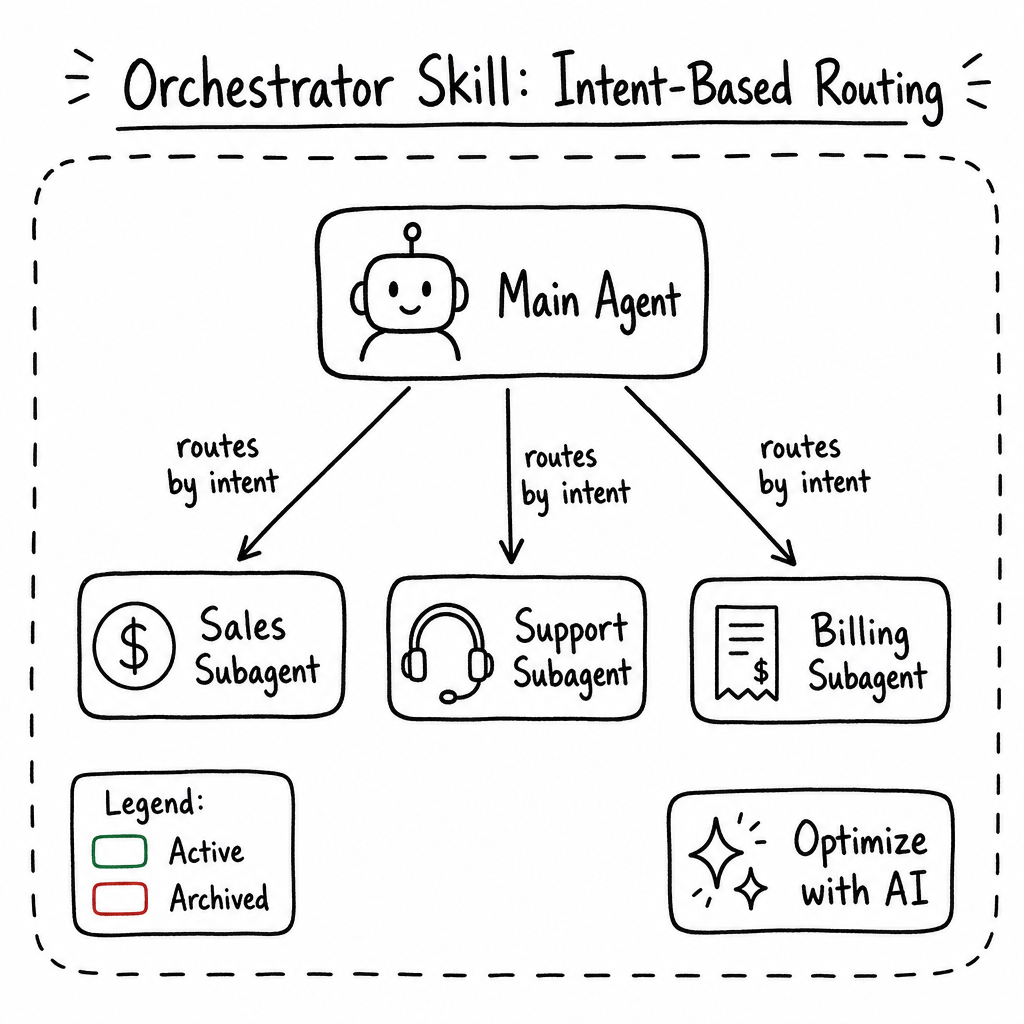
The Orchestrator skill lets a supervisor agent chain multiple specialized agents together into intent-driven workflows. Instead of building one massive do-it-all agent, you assign subagents to a main agent and route each user request to the subagent best suited to handle it. Routing can happen three ways: prompt-based (the LLM picks a subagent via function tools), keyword-based (matching rules trigger a subagent automatically), or direct selection from the Copilot input. Responses handled by a subagent are labeled inline in the UI so it's always clear which agent produced them, and the platform prevents infinite loops with built-in cyclic dependency protection up to 50 levels deep.
Key features
Prompt-Based Orchestration
Subagents are exposed to the main agent's LLM as callable function tools. The main agent decides when to call one, receives the response, and can further refine or process it before returning the final answer to the user.
Keyword-Based Routing
Configure keyword rules that automatically route matching requests to a specific subagent. The request bypasses the function tool flow and uses the subagent's AI configuration directly, so the response comes straight from the subagent.
Direct Subagent Selection in Copilot
End users can pick a subagent directly from the Copilot input. Like keyword routing, the message is sent using the selected subagent's message-processing configuration without a second pass by the main agent.
Subagent Response Attribution
Messages produced by a subagent are marked in the UI with a dedicated icon and label so operators and end users can immediately tell which agent generated each response.
Visual Workflow Graph
A React Flow canvas visualizes the hierarchy of agents; active subagents outlined in green, archived ones in red, and every node is clickable to jump to that agent.
AI-Optimized Descriptions
The Optimize with AI helper rewrites subagent descriptions into a 75–150 word prompt tuned for LLM tool selection.
Deep Context Passing
The supervisor forwards the user's message, context, and any attached files directly to the selected subagent.
Cyclic Dependency Protection
The platform blocks circular subagent assignments automatically, preventing infinite loops up to 50 levels deep.
Isolated Execution
Subagents run in a background context — they see the user message and attachments but not the parent agent's private prompts or unrelated history.
Attributed Token Usage
When a subagent is invoked, token consumption is attributed to the subagent's ID and billed against the organization's quota.
How to configure it
- 01
Enable the Skill: Open your agent's Skills tab, find the Orchestrator card, and click SET UP to enter the Orchestrator configuration page.
- 02
Add a Subagent: On the Orchestrator page click Add Subagent, then choose an existing agent from your organization (the current agent and already-linked subagents are excluded).
- 03
Write the Subagent Prompt: Describe what this subagent does and when it should be called. This description is the single most important input for prompt-based routing — the main agent uses it to decide when to route requests.
- 04
Optimize with AI: Click Optimize with AI to have raia rewrite your description into a 75–150 word prompt formatted for LLM tool selection (expertise, intent, exclusions), then click Create.
- 05
Configure Keyword Routing (optional): On the subagent, add one or more keywords that should route requests directly to it. Matching messages skip the main agent's function tool flow and are handled by the subagent's own AI configuration.
- 06
Enable Direct Selection in Copilot (optional): Allow end users to pick this subagent from the Copilot input. When selected, the message is processed using the subagent's configuration without a second pass by the main agent.
- 07
Manage the Agent Tree: Use the Subagents Table to Archive (temporarily disable routing) or Delete (permanently unlink) subagents, and use the Orchestrator Graph to visually inspect and navigate the hierarchy.
Frequently asked questions
What's the difference between prompt-based, keyword-based, and direct selection routing?
Prompt-based routing uses function tools: the main agent decides when to invoke a subagent, receives its response, and can refine or reprocess it before replying. Keyword-based routing and direct selection in the Copilot input skip the function tool flow entirely — the request is sent using the selected subagent's message-processing configuration, so the response comes straight from the subagent without a second pass by the main agent.
How do I know which agent produced a given response?
Messages handled by a subagent are marked in the UI with an additional icon and label identifying the subagent, so it's always clear whether the response came from the main agent or one of its subagents.
How does the main agent decide which subagent to call in prompt-based mode?
Each subagent is exposed to the main agent's LLM as a callable tool, and the model picks the best match based on the Subagent Prompt (description) you wrote. Clear, intent-focused descriptions with explicit exclusions produce the most accurate routing.
Can a subagent call another subagent?
Yes — subagent chains are supported and the platform automatically prevents circular assignments up to 50 levels deep, so you don't have to worry about accidental infinite loops.
Does a subagent see the parent agent's conversation history or system prompt?
No. Subagents execute in an isolated background context. They receive the user's message and file attachments only — never the parent's private system prompts or unrelated history.
Who is billed for the tokens a subagent consumes?
Token consumption is attributed to the subagent's own agent ID and billed against your organization's overall token quota, so usage stays transparent and traceable.
What permissions do I need to link a subagent?
You need UPDATE_AGENT permissions on both the parent agent and the target subagent to create the link.