Agents are the raia cX AI services that do the heavy lifting in Command — converting, training, and processing. The Agents page is where you link an agent to one or more organizations and decide what it is allowed to do.
In this section
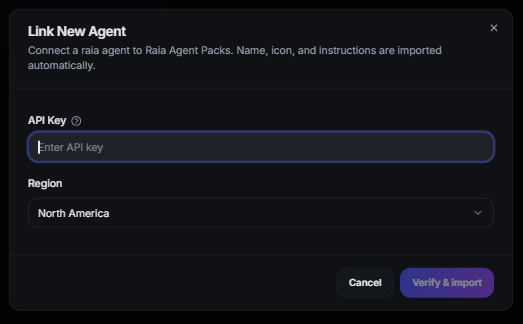
- Link an agent with its API key, region, and webhook URL.
- Choose which capabilities an agent may perform.
- Set an org default conversion agent and override it per project.
- Understand where agent output lands and how access is revoked.

What's inside
- 01
Linking an agent
Open Agents from the sidebar, pick an organization, use the Link Agent tab, and supply a descriptive name plus the agent's API details. API keys and callback tokens are stored as masked hints (••••1234) — only the last few characters are ever shown.
- 02
Capabilities and regions
Enable conversion, training, processing, or any combination per agent. Agents are region-aware (US or EU) and calls route to the matching backend. Reports for a connected agent read from that same region.
- 03
Default and per-project agents
Mark one agent as the organization's default for conversion — new projects inherit it and its name appears in toasts and action cards. Each project's AI Settings page can override the conversion, training, and processing agents without affecting other projects.
- 04
Agent output
Every agent that processes files gets its own 'Agent Output (Agent Name)' folder in the Data Room, so results never mix between agents.
- 05
Webhooks
Set a webhook URL if the agent should return results automatically. All agent webhook payloads — Markdown conversion and processing alike — include the original fileName so external systems can preserve document identity.
- 06
Revoking access
Agent access is scoped to the organizations you connect it to. Removing an agent from an organization stops new jobs immediately; existing reports stay available.