How it works
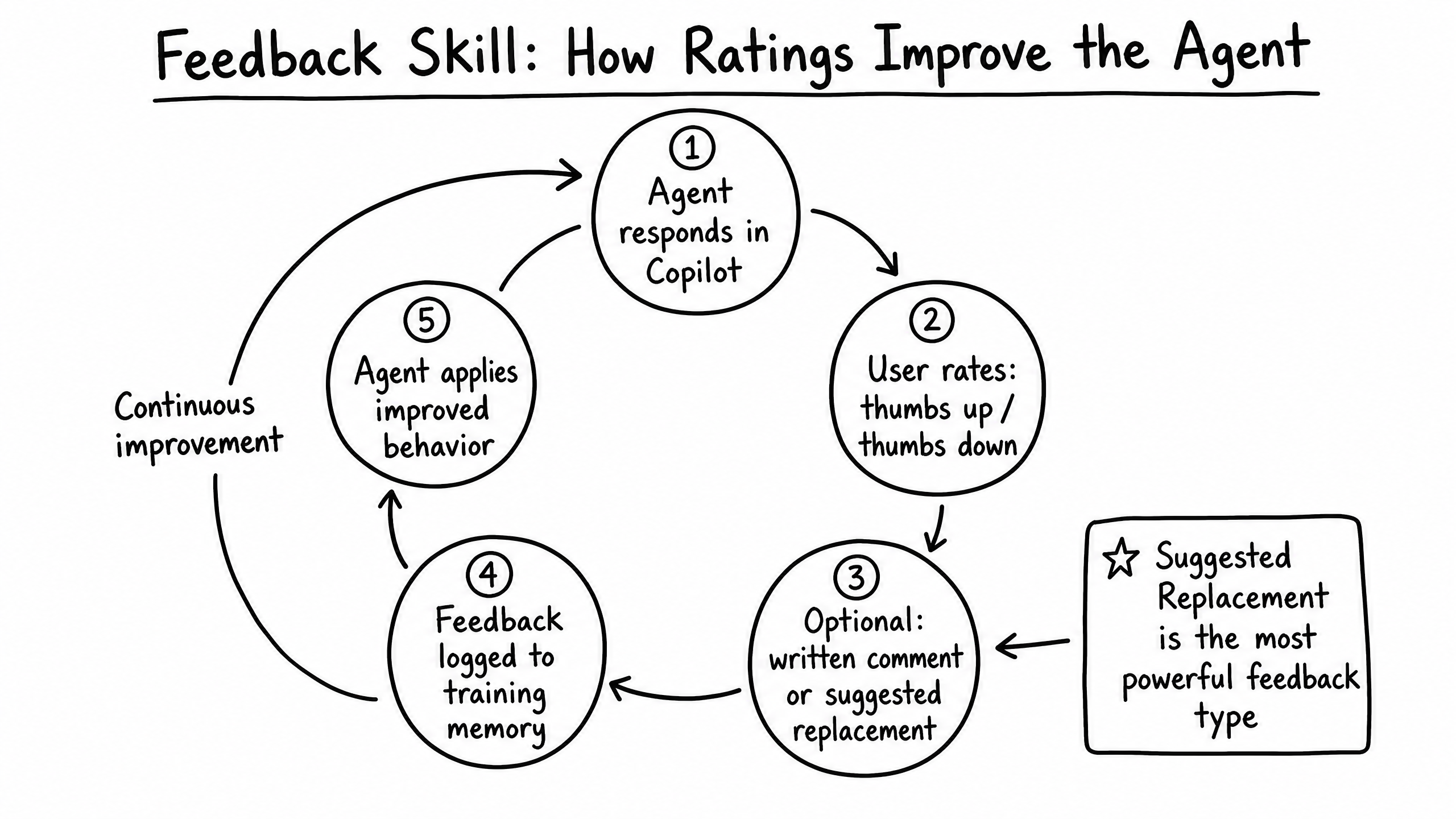
The Feedback skill allows users (both external customers and internal Agent Users) to rate the agent's responses. This feedback is fed back into the agent's training memory to drive continuous improvement.
Video overview
Key features
Thumbs Up / Down
Simple binary rating for quick feedback.
Written Comments
Users can provide context for why an answer was unhelpful.
Suggested Replacements
Agent Users can provide the exact text the agent should have used.
Continuous Learning
Approved feedback is automatically incorporated into the agent's behavior.
How to configure it
- 01
Enable the Feedback skill in Launch Pad.
- 02
Choose whether the thumbs up/down UI should be visible to end-users in the Live Chat widget.
- 03
Regularly monitor the Feedback tab in Copilot to approve or reject suggested replacements.
Frequently asked questions
Does a thumbs-down immediately change the agent's behavior?
No — it flags the response for review. Only approved Suggested Replacements or explicit Instructions/Knowledge updates change behavior.
Can I disable feedback for external users?
Yes — configure the skill to only allow internal Agent Users (via Copilot) to submit feedback.