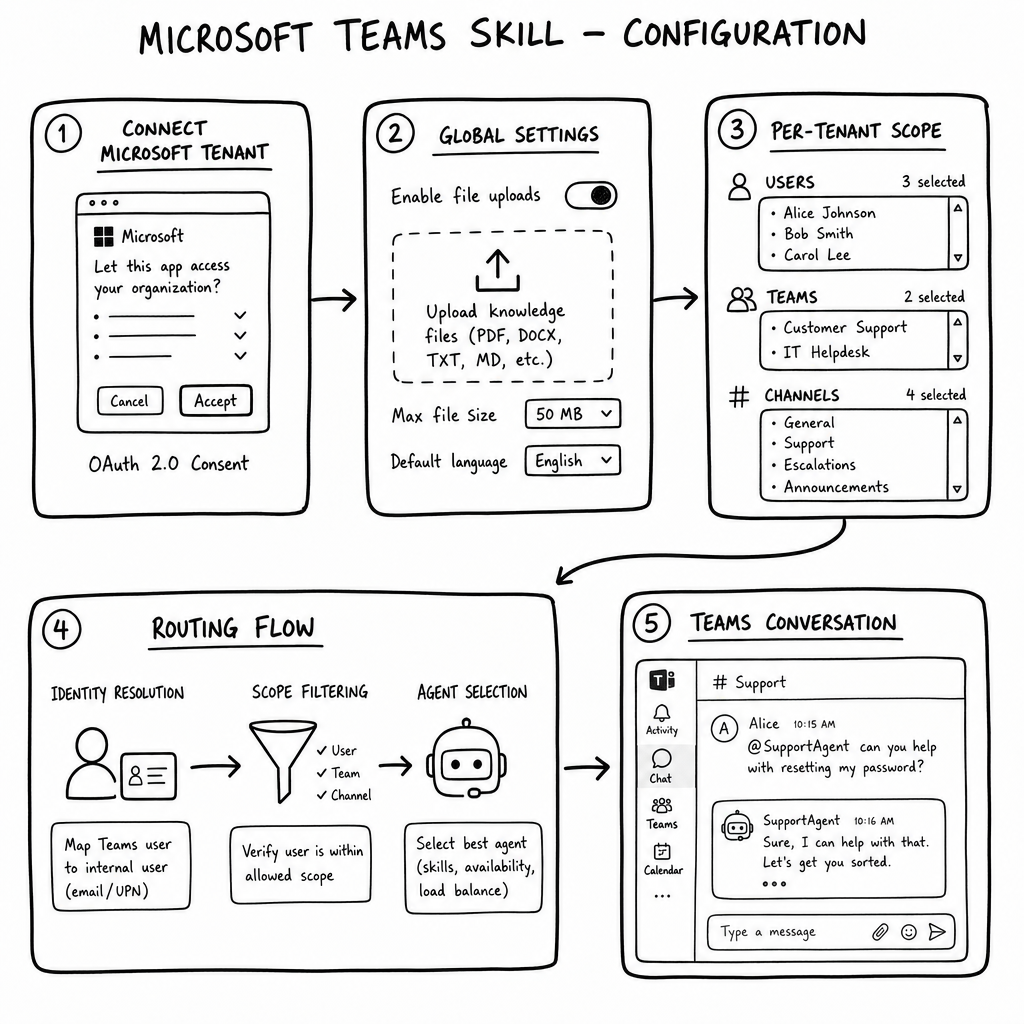
How it works
The Microsoft Teams skill connects a raia agent directly to Microsoft Teams. Once a Microsoft tenant is linked at the organization level, users can send direct messages, @mention the agent in channels, and upload files — all while the admin controls exactly which tenants, teams, channels, and users are allowed to reach the agent.
Key features
Direct Messages
Users can chat 1-on-1 with the agent from their Teams personal chat.
Channel Mentions
Users can @mention the agent in a Teams channel to bring it into a thread.
File Uploads
Users can attach files (up to 5 files, max 20 MB each) for the agent to process.
Typing Indicators
The bot automatically sends typing events while the LLM is generating a response.
Multi-Tenant Support
A single agent can be exposed to multiple connected Microsoft tenants at the same time.
Granular Scope Control
Admins choose which tenants, teams, channels, and users are allowed to talk to each agent.
How to configure it
- 01
Open the Microsoft Teams skill card on the agent and connect a Microsoft tenant via the admin consent OAuth flow.
- 02
Enable or disable each connected tenant for this specific agent.
- 03
Toggle Global Settings such as File Uploads to control what users can send.
- 04
Configure per-tenant scopes: choose which users can send DMs and which teams/channels can @mention the agent.
- 05
Test the agent by sending a direct message or @mentioning it in an allowed channel.
Frequently asked questions
What happens if multiple agents match the same scope?
The bot replies with an Adaptive Card asking the user to select which agent they want to talk to.
What is the difference between disabling a tenant and disconnecting it?
Disabling stops only this agent from responding in that tenant. Disconnecting removes the Microsoft connection from the whole organization and affects all agents.
What are the file upload limits?
Up to 5 files per message, 20 MB per file, and no empty files. Unsupported Teams card formats are skipped automatically.
What if the OAuth token expires or is revoked?
The tenant shows a 'Needs re-authorization' badge. The admin must reconnect to restore service.
Can the agent respond in group chats?
The agent responds wherever it is @mentioned within the configured team and channel scopes, including standard channel threads.