The real product is the context
Models still matter, but many agent failures are context failures rather than model failures. The agent was never told the refund policy, couldn’t see the customer’s account, or was handed a wall of irrelevant documents and picked the wrong one.
For two years the industry talked about prompt engineering: finding the right words to coax a model into the right answer. That skill still matters, but it is now the smallest part of the job. The bigger job is context engineering: deciding what an agent knows, what it can look up, what it can do, and what it remembers, at the exact moment it has to act.
This article explains the difference, why it matters for vertical software companies, and how context can be engineered centrally with raia: preparing knowledge at the source in Command, and delivering it through a governed intermediary agent this guide calls a Gate, so individual users don’t have to do it at the edge.
Prompt engineering: necessary, not sufficient
Prompt engineering is the craft of writing instructions a model follows well. It covers role and tone, clear task framing, examples of good and bad output, output formats, and step-by-step reasoning cues. Done well, it turns a vague assistant into a consistent one.
It runs out in three places:
- Static instructions alone don’t supply current facts. Fixed instructions cannot know this customer’s contract, this ticket’s history, or what changed in the product last Tuesday. A prompt can include dynamic context, but that context has to be selected and kept current, which is the context engineering job.
- It doesn’t scale with knowledge. You cannot paste a 400-page product manual into a system prompt. Cramming more in makes the agent slower, more expensive, and often less accurate.
- It lives in one person’s head. The prompt that works is usually the one a single engineer tuned by hand. Nobody else knows why each line is there, so nobody else can safely change it.
A great prompt with poor context still produces a confident wrong answer. That is the gap context engineering closes.
Context engineering: designing everything the agent sees
Context engineering is the discipline of assembling the right information, tools, and memory into an agent’s context window at the moment it acts. The prompt is one input. The context is the whole picture.
Each time an agent answers, its context window is filled from several layers. These layers often change at different rates; the suggested owners below are starting points, not fixed rules:
| Layer | What it holds | How often it changes | Natural owner |
|---|---|---|---|
| Instructions | Role, goal, rules, autonomy limits, output format | Monthly | Agent builder |
| Knowledge | Manuals, help articles, policies, release notes | Weekly | Subject-matter experts |
| Structured data | Price lists, contracts, inventories, account records | Daily | Operations / data owners |
| Tools | Functions, APIs, webhooks, MCP connections the agent can call | Per release | Technical builder |
| Conversation | The live exchange with the user | Every turn | The user |
| Learned corrections | Approved feedback and suggested replacements | Continuously | Agent managers |
The engineering problem is not filling the window. It is filling it with only what matters. Too little and the agent guesses. Too much and it gets slower, costlier, and distracted by irrelevant chunks. Good context engineering is mostly about selection, structure, and freshness.
Why this matters for vertical software companies
A vertical software company’s advantage is its domain knowledge. Twenty years of edge cases, configuration quirks, customer workarounds, and regulatory nuance live in ticket histories, Confluence pages, SharePoint folders, and the heads of senior support staff. A general-purpose model knows none of it.
For a vertical software company, domain context can be a competitive advantage alongside model quality. Four reasons it pays to treat context as an engineering discipline:
- Accuracy. Support agents in vertical markets fail on specifics: the right version, the right module, the right customer contract. Only curated, current context gets those right.
- Cost. Every unnecessary token sent to a model is paid for. Tight retrieval and structured data cut token spend, and well-structured instructions improve cache hit rates on expensive models.
- Governance. When knowledge is scattered across individual Claude projects and personal prompts, nobody controls what the AI knows or who can see it. Centralised context can be scoped, audited, and protected.
- Capacity. The people who hold the domain knowledge are your support and operations teams. Context engineering is how they move from users of AI to builders and managers of it, multiplying the team rather than replacing it.
The difficulty of AI deployment hasn’t disappeared. It has moved from technical to cognitive: deciding what the agent should know. That is work your domain experts are best placed to do, if the platform lets them.
How to engineer context in raia
Most users will never engineer context themselves. They connect a tool, ask a question, and accept whatever the model pulls in. Asking hundreds of people to curate sources, write guardrails, and trim tool output at the edge doesn’t work. raia does that work centrally, in four places, so the edge doesn’t have to:
| Where context is engineered | What raia does | Product |
|---|---|---|
| At the source | Connects systems, converts and classifies content, trains the vector store, structures exact data as Tables, scans for PII | raia Command |
| In the agent | Sets role, rules, autonomy limits, output format, and the tools the agent may call | raia cX |
| At the point of delivery | A Gate is a proposed pattern in this guide: an ordinary raia agent placed between external tools (Claude, ChatGPT and others) and your systems, with scoped access in and instruction-guided answers out | raia agent used as a Gate (pattern) |
| Over time | Supports testing changes and reviewing human feedback so people can correct instructions or documents | raia Copilot and Command Training |
The first two make knowledge AI-ready. The third is a way to have AI tools consume it through the same configured agent. The fourth helps keep it current when people do the review work. The five steps below follow that loop; the Gate pattern gets its own section after them.
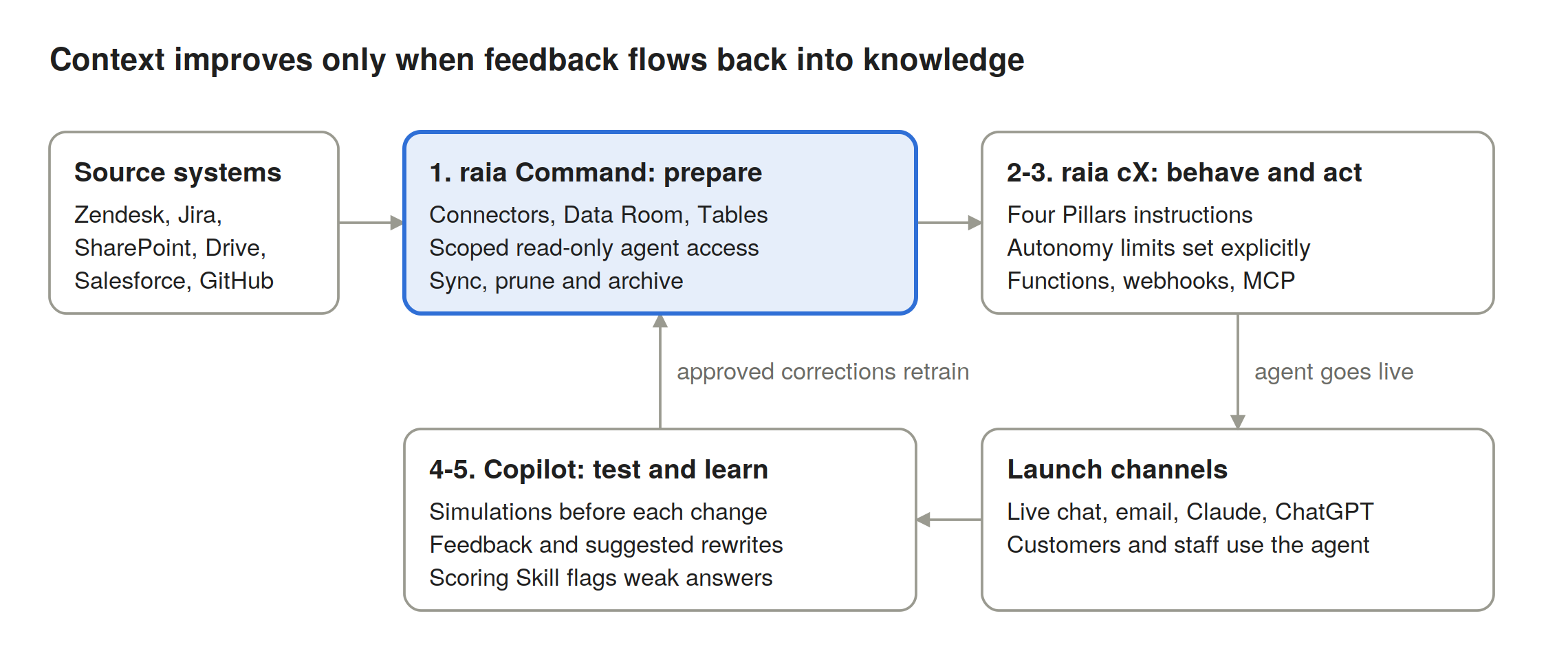
Knowledge flows from your systems into Command, out through the agent to every channel, and back as approved corrections.
1. Prepare knowledge in raia Command
raia Command is the knowledge layer. Teams connect source systems such as Zendesk, Salesforce, Google Drive, Jira, GitHub, and SharePoint, so agent knowledge stays synced with where work already happens. Uploaded files move through a visible pipeline (Queued → Converting → AI Ready → Training), with AI classification on upload and a PII scan under Data Protection.
Two choices matter most here:
- Use Tables for facts that must be exact. Price lists, contracts, and inventories belong in structured Tables with typed columns, not in documents the agent must search and interpret.
- Scope access per agent. Each agent gets read-only access to only the Knowledge, Tables, and connector tools it needs. A billing agent should not see HR policy.
2. Define behaviour with structured instructions in raia cX
The system prompt is the agent’s operating rules, not its encyclopedia. raia’s Advanced Prompt Engineering module recommends Four Pillars: Role & Goal, Instructions & Constraints, Tools & Resources, and Output Format, in roughly 500 to 1,500 words.
Keep rules in the prompt and facts in Command. The prompt usually wins when it conflicts with a retrieved document, so a stale fact hard-coded in instructions will override your current knowledge base. Use the prompt to set the autonomy dial explicitly, for example “issue refunds up to $50; draft anything larger for approval.”
3. Give the agent tools, and expose context to the tools your team already uses
Functions, webhooks, and the raia API let an agent fetch live data at the moment it needs it, rather than carrying it in every prompt. Command’s MCP Servers go the other way: they expose Command projects read-only to external tools like Claude and ChatGPT over API key or OAuth 2.1. One governed knowledge base can then feed raia agents and your team’s Claude work alike. That is raia + Claude, not raia vs Claude.
4. Test context changes before they ship
Every knowledge upload and prompt edit changes behaviour. Simulations let you run selected questions against agents and compare their answers, then review or export the results yourself. They are not an automatic version comparison or release gate. Keep a standing set of hard cases (the ten questions your best support rep gets wrong-footed by) and re-run them after every significant change.
5. Close the loop with human feedback
In Copilot, users can give a thumbs up, thumbs down, written comment, or a suggested replacement: the exact answer the agent should have given. An admin reviews it in the Feedbacks list, ignores what does not apply, corrects the agent's instructions or documents where needed, and re-tests. Feedback does not change the agent by itself; the improvement comes from the correction a person makes. The Scoring Skill rates conversations against the rubric you configure (our fictional demo used 1 to 10), so reviewers can focus on low scores.
The Gate pattern: one governed front door for AI tools
This section describes a design pattern proposed in this guide, built from an ordinary raia agent. It is not a separately released product, and each capability below is available only where it is configured on that agent.
The fastest way to lose control of context is to let every employee wire Claude directly into Drive, Jira, Salesforce, and the help desk. Each person ends up responsible for their own context, with broad permissions, no shared guardrails, and raw data flooding their context window. In practice many of them won’t engineer it at all.
A Gate flips that. Claude (or another compatible MCP client) connects to a raia agent acting as a Gate instead of to the systems themselves. The Gate agent holds three things the team manages centrally:
- Scoped tools and systems. Only the connectors, Tables, and Command knowledge that role should reach.
- System instructions that guardrail the return. What to answer, what to leave out or redact, how much to send back, and when to refuse.
- Its own retrieval. The Gate does the searching and filtering, so Claude receives a concise answer rather than a pile of raw documents.
The aim: the Claude tool or agent gets what it needs and only what its configured access allows. Test the instructions and returns; instructions guide the model but are not a guarantee.
A Gate is a full agent, not a proxy
A Gate does more than evaluate and filter context. It runs on the same platform as every raia agent, so it can carry the full skills directory for oversight and control:
| Skill | What it does on a Gate |
|---|---|
| Auditor | Reviews messages for PII, prompt injection and custom rules and notifies recipients; not a compliance firewall, and blocking is not verified |
| Escalation | Hands off to a human when confidence is low, a keyword appears, or a business rule fires |
| Human in the Loop | Review queues and approval gates: a person approves, edits, or rejects sensitive answers and actions |
| Scoring | Scores conversations against your configured rubric |
| Feedback | Ratings, comments, and suggested replacements that people review and act on |
| Report | Performance digests to configured destinations such as email or BI tools; verify scheduling and delivery |
| Data Retention | Configured retention and anonymization intended for older conversations; verify the operational lifecycle |
| Message Quota | Daily message limit per user, described across channels (only a bounded Copilot check is verified) |
Just as important is visibility. Conversations through a Gate can be reviewed in Copilot, subject to your role, filters and the channels configured. What is recorded about each decision or handoff depends on the actual audit evidence available. That record supports human feedback on what the Gate returned, corrections people make, and reporting on how the business uses AI.
Direct connection vs a Gate
| Claude connected directly to systems | Claude connected through a raia Gate agent | |
|---|---|---|
| Access | Each user’s own permissions, often broad | Least privilege, set once per Gate |
| Guardrails | Whatever the user put in their prompt | Central system instructions on every return |
| Context size and cost | Raw records and documents in Claude’s window | Filtered, summarised answers |
| Change management | Every user updates their own setup | Update the Gate once; verify the linked version, how changes propagate and which clients use it |
| Visibility | Scattered across personal chats | Conversations reviewable in Copilot (by role) and scorable where Scoring is configured |
Connecting is no-code: add the agent’s MCP URL as a custom connector in Claude, approve the OAuth consent screen, then call it with @raia in any chat. Claude routes the question through the agent’s full pipeline, including its knowledge base, connectors, and skills.
Two configured workflows compared
This compares two example setups and their tradeoffs; it does not describe limits of Claude itself. In Claude, an Owner can add a custom connector for the organization and then each member connects with their own account. In that setup, what reaches each user’s context depends on the connectors and servers they use and what those return. In the Gate setup, a raia agent does the retrieval and its instructions shape the answers; what it can access depends on its credentials and the source servers’ permissions, because instructions are not enforcement.
| Claude Enterprise | raia | |
|---|---|---|
| Which systems users can reach | Admin adds connectors org-wide; each user authenticates with their own account | Gate agents hold scoped connections centrally |
| What reaches the context window | Whatever each connected server returns, per each user’s permissions | Answers shaped by the Gate’s instructions |
| Shared knowledge | Org-shared Projects: curated uploads with RAG, used in this example within Claude | In this example, Command knowledge synced from source systems and served to compatible, approved clients |
| Standard procedures | Org-provisioned Skills: how Claude does a task | Agent instructions and Gate return rules: what data comes back |
| Users, audit, and spend | Per Claude’s own admin features | Gate conversations reviewable in Copilot, with the skills you configure |
The gate pattern itself isn’t unique to raia; it’s good architecture. A capable engineering team could write an MCP server that retrieves and filters context for Claude. That is the easy part.
The harder part is everything a business needs before it trusts that layer between Claude and its data and systems: review and alerting, escalation and human approval, audit trails, visibility into every conversation, quality scoring, a feedback-to-training loop, reporting, data retention, connectors to vertical systems, and the security and uptime to run it all in production. Few business units would build that, and fewer would feel confident operating it.
With raia, much of this middle layer can be configured without code, using the skills available on your agent; test each one before relying on it. The same agent and knowledge can also serve other configured channels, not just Claude.
In one line: the Gate pattern puts a centrally managed agent in front of your systems, so context is shaped in one place you can review and test.
Designing Gates
A few design rules keep Gates manageable:
- One Gate per domain or role, such as a Support Gate or a Finance Gate, not one Gate for everything.
- Write instructions for the return, not just the task. Specify length, required source references, fields that must never be returned, and the out-of-scope response.
- Test and monitor like any agent. Run simulations before changing a Gate, and review its low-scoring conversations in Copilot.
This is what makes context engineering scale. Instead of hundreds of individually tuned Claude setups, the team engineers a handful of Gates, and every AI tool in the business inherits the same governed context.
Making context engineering a team discipline
Context engineering fails when it belongs to one engineer. It works when every layer has a named owner, a cadence, and a measure. raia’s three learning paths map onto these roles: Functional Expert, Technical Builder, and Agent User.
| Role | Owns | Cadence | Measure |
|---|---|---|---|
| Knowledge owner (subject-matter expert) | Command projects, folders, Tables, connector scope | Weekly freshness review | Share of answers citing current sources |
| Agent builder (functional expert) | Instructions, autonomy limits, output format | Change only with a simulation run | Simulation pass rate on hard cases |
| Technical builder | Functions, webhooks, MCP access, model choice | Per release | Tool error rate; tokens per resolved conversation |
| Agent manager (support lead) | Feedback review, “Include in Training” decisions | Daily triage of low scores | Average Scoring Skill score; FTEE delivered |
Three habits make it stick:
- Treat context changes like code changes. Every prompt edit or bulk upload gets a simulation run and a one-line change note.
- Prefer suggested replacements over complaints. A rewritten answer is training data; a thumbs-down alone is just a signal.
- Prune as often as you add. Retired products, superseded policies, and duplicate articles degrade retrieval. Archive them in Command rather than leaving them for the agent to find.
Where to start this week
You don’t need a context strategy document to begin. You need one agent, one knowledge project, and one feedback habit.
- Pick the use case with the clearest ROI, usually support ticket resolution.
- Create one Command project, connect your help desk and docs, and import your most-asked-about data as a Table.
- Rewrite the agent’s instructions into the Four Pillars and move every hard-coded fact into Command.
- Write ten hard test conversations and run them as simulations.
- Name a knowledge owner and an agent manager, and review low-scoring conversations every day for two weeks.
- Put a raia Gate agent between your team’s Claude use and that domain’s systems, so every AI tool draws on the same governed context.
Prompt engineering made individuals more productive. Context engineering helps the whole team’s knowledge work across the agents and channels you configure. Built by Constellation for Constellation companies.