What raia cX gives you
- The core agent platform: Launch Pad, Copilot, Chat, and the Skills library.
- One agent definition that runs consistently across every customer channel.
- Human oversight — operators can review conversations and step in where human-in-the-loop is enabled and their role allows.
What's inside raia cX
raia cX is the core platform. Everything you need to build, supervise, and deploy an AI agent lives inside it. An agent built once retains its instructions, knowledge, and skills across every channel it's deployed to.
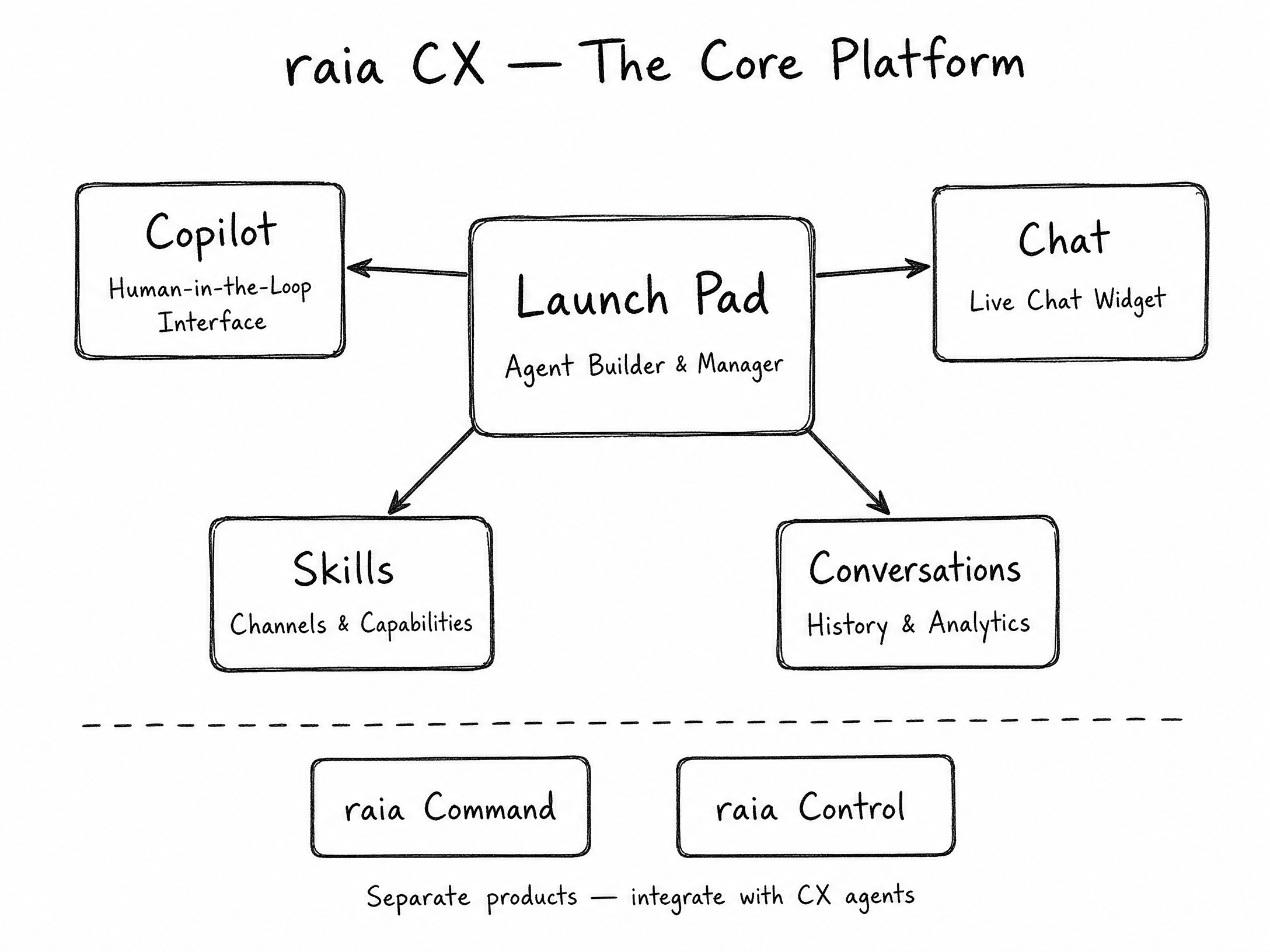
These four parts aren't separate places you visit in order. You build an agent in Launch Pad, and that is also where you add skills from the Skills Library, including the channel skill (Live Chat, SMS, Email or Voice) you need before customers can reach the agent through raia Chat. Copilot is where your team supervises the conversations.
Module 01
Launch Pad
The builder. Create agents, write instructions, upload knowledge, and toggle skills on or off.
Primary userFunctional Expert, Admin
Module 02
Skills Library
Add-ons that let your agent do more, like texting, emailing, or connecting to your other tools.
Primary userFunctional Expert
Module 03
raia Chat
The customer-facing surface: a website widget, SMS, email, or voice. Before deploying, add the channel skill you want (Live Chat, SMS, Email or Voice) on the agent's Skills tab in Launch Pad.
Primary userEnd Customer
Module 04
raia Copilot
Human-in-the-loop oversight. Monitor live conversations, step in where enabled, score responses, and give training feedback.
Primary userAgent User
One Agent. Every Channel
Use the same agent across your enabled channels: web chat, SMS, email and voice. Its instructions, knowledge and configured skills stay consistent on every channel. Whether a conversation continues from one channel to another is a separate question. Before relying on it, test it: send the agent a text, then email it, and check what context from the text is available in the email reply.
Web Chat
Embed the Live Chat widget on any website or portal for instant, AI-assisted conversations.
SMS
Reach customers on their phones with two-way text conversations that feel personal and immediate.
Handle inbound and outbound email threads with the same instructions, knowledge and escalation rules as your other channels.
Voice
Let callers speak naturally while the agent listens, reasons, and responds in real time.
Recommended practice: test each enabled channel, and any handoff between them, with a test contact before you rely on it.
Products that integrate with cX
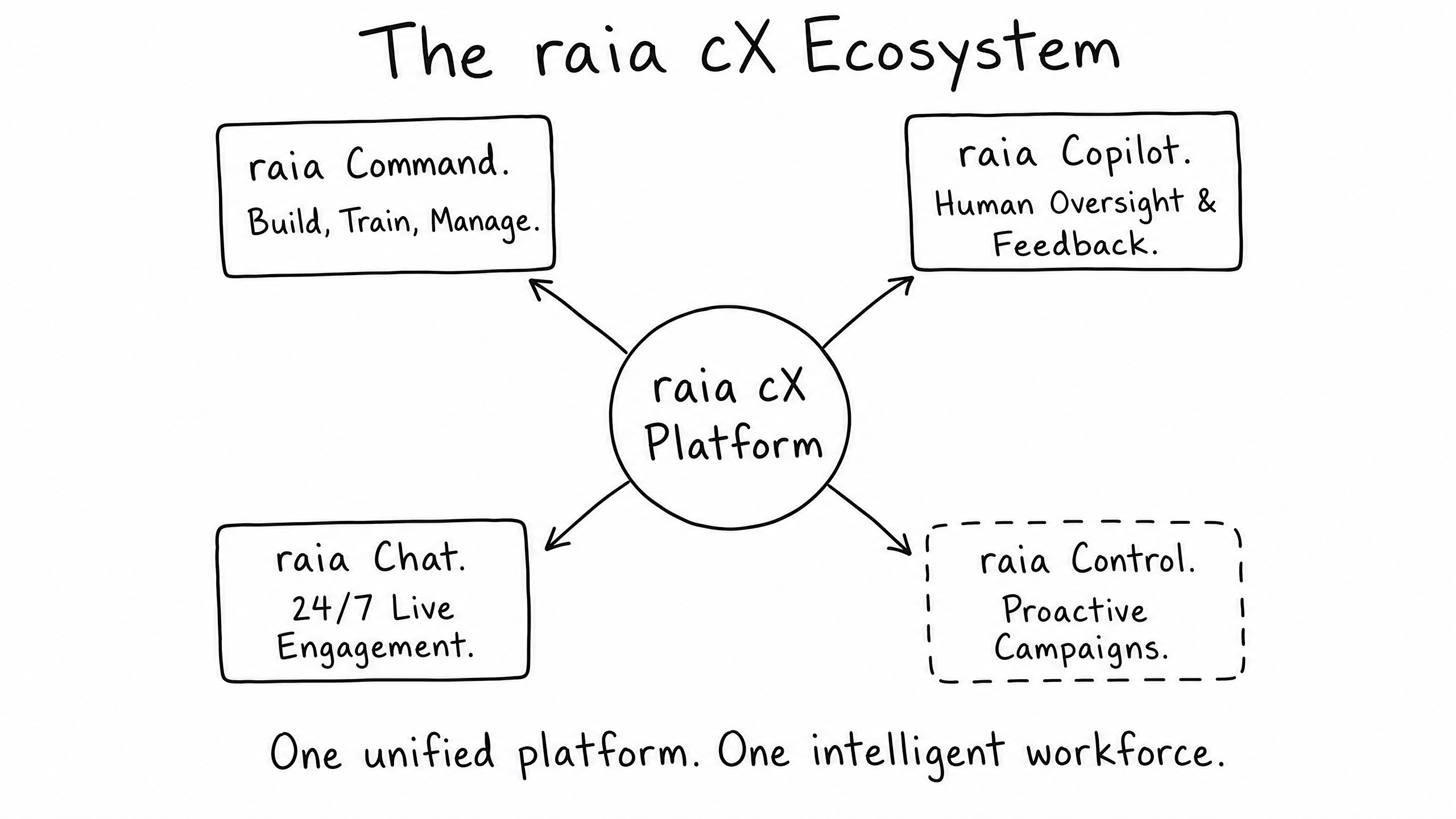
Command and Control are separate products. They aren't part of cX — they're standalone tools that connect to the agents you build in cX when you need them.
Add-on product
raia Command
A separate product for organizing your documents and spreadsheets so agents can use them, and for connecting tools like Zendesk, Salesforce and Google Drive so agent knowledge stays up to date. Command also prepares documents for an agent's vector store: a searchable index the agent uses to find the right passage when it answers.
Add-on product
raia Control
A separate outbound campaign product that runs proactive missions against agents you've built in cX.
Security
Operate raia safely
Access control, auditing, and PII handling.
Key Platform Capabilities
No-Code Deployment
Build and deploy agents without writing code — accessible to business domain experts.
Unified Skills Layer
One Skills library powers every channel, so behaviour and integrations stay consistent across web, SMS, email, and voice.
Human oversight
Copilot lets operators with the right role monitor conversations and step in where human-in-the-loop is enabled.
Enterprise Security
Designed for regulated industries: control who can access what (role-based access), review how personal customer information is handled (PII auditing), and connect to other apps through their secure sign-in (OAuth).
Usage Limits & Resource Consumption
Cap tokens, SMS, emails, and voice minutes at organization, agent, and user levels to prevent unexpected costs.
Where to start
If you are building an agent
Start in Launch Pad — define purpose, upload training data, and toggle skills. See the Launch Pad deep dive for a tab-by-tab walkthrough.
If you are extending agent capabilities
Browse the Skills Directory to see every modular capability you can attach. Skills Directory
If you are deploying to customers
Configure raia Chat for the web widget, SMS, email, or voice channels.
If you are monitoring live agents
Start in raia Copilot: watch live conversations, step in when needed, and score responses.